Tech Stack
LangGraph
A library for building stateful, multi-actor applications with LLMs. Unlike simple chains, LangGraph allows for cycles, enabling agents to loop, reason, and correct themselves until a task is complete.
Ollama
The easiest way to get up and running with large language models locally. It bundles model weights, configuration, and data into a single package, defined by a Modelfile.
Environment & Model Setup
1. Project Environment
Open your terminal and run the following commands. We recommend using uv for lightning-fast
Python package management. Otherwise, you can
download Python manually install the required packages.
                    # Install uv

                    curl -LsSf https://astral.sh/uv/install.sh | sh


                    # (Optional) If pip is available:

                    # pip install uv


                    # Create & activate environment

                    uv venv

                    source .venv/bin/activate


                    # Install dependencies

                    uv pip install langchain-ollama langgraph langchain-core chromadb sentence-transformers pillow
                     # Install uv (PowerShell)

                    powershell -c "irm https://astral.sh/uv/install.ps1 | iex"


                    # (Optional) If pip is available:

                    # pip install uv


                    # Create & activate environment

                    uv venv

                    .venv\Scripts\activate


                    # Install dependencies

                    uv pip install langchain-ollama langgraph langchain-core chromadb sentence-transformers pillow
2. Get Ollama Ready
First, download Ollama from ollama.com. Once installed, open a new terminal to pull the model we'll use (Qwen3 0.6B for speed). More models can be found at ollama models.
                # Pull a small, capable model

                ollama pull qwen3:0.6b-q4_K_M


                # Start the server (if not running)

                ollama serve
Building the Agent - Minimal Demo
We will construct a minimal agent using LangGraph and a local Ollama model (Qwen3 0.6B) that can answer questions using an external course dataset, solve simple arithmetic problems with the help of a calculator function, and save notes to your disk. In the following sections, we will break down the core logic of the agent step by step.
1. Basic Tools
Before giving the agent a brain, we give it hands. Tools are simple Python functions decorated with
@tool. The docstring is crucial, it tells the LLM when and how to use the
tool.
@tool
def calc(expression: str) -> str:
"""Evaluate a simple arithmetic expression."""
# ... logic to eval safely ...
result = eval(expression, {"__builtins__": {}}, {})
return str(result)
@tool
def write_text(path: str, content: str) -> str:
"""Write text content to a local file."""
# ... logic to write file ...
with open(path, "w", encoding="utf-8") as f:
f.write(content)
return f"Saved to {path}"2. Knowledge Retrieval (RAG)
For domain-specific questions (like university courses), the agent needs to search some external data. For demonstration, we load a dummy CSV file as follow, and create a search tool invokes by the agent based on keywords.
courses.csv
code,title,description,level
CS101,Introduction to Programming,Learn basic programming concepts using Python,Undergraduate
CS204,Data Structures,Study arrays lists trees and graphs,Undergraduate
CS305,Machine Learning,Supervised and unsupervised learning methods,Undergraduate
CS705,Advanced AI Agents,Design and evaluation of autonomous AI agents,Postgraduate
CS710,Research Methods in AI,Experimental design and evaluation for AI research,Postgraduate# Load data once
COURSES = load_courses("courses.csv")
@tool
def search_courses(query: str) -> str:
"""A simple search of the course dataset for relevant entries."""
# ... calculates relevance score for each course ...
# ... returns top matches as a formatted string ...
return results3. The Brain (LLM & State)
At the core of our agent is the Brain—a combination of the LLM (Ollama), the System Prompt (instructions), and the State (memory).
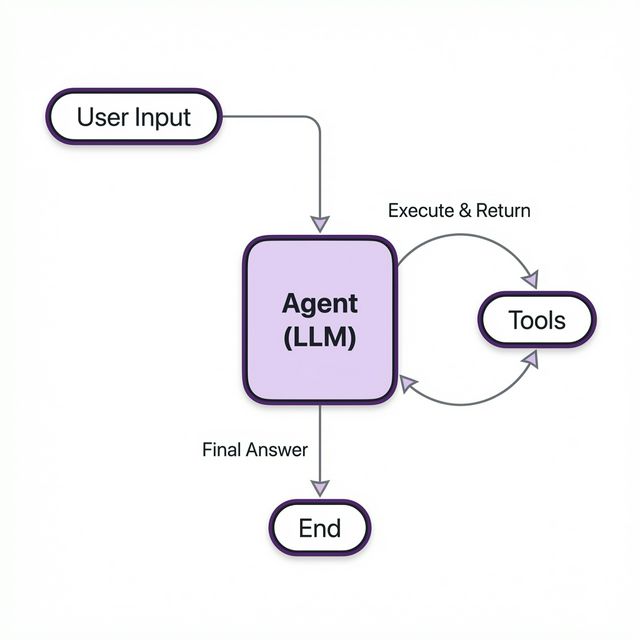
The cyclic flow of the LangGraph agent.
The System Prompt
This is where we give the agent its personality and rules. We explicitly tell it which tools to use and how to behave. This reduces hallucinations and ensures it follows our constraints. An example prompt can be:
SYSTEM_PROMPT = SystemMessage(
content=(
"You are a helpful assistant with access to tools.\n"
"Guidelines:\n"
"- Use search_courses for queries about the curriculum.\n"
"- Use calc for any math.\n"
"- Use write_text to save files."
)
)The State
The AgentState acts as the short-term memory. It stores a list of messages that
grows as the conversation progresses. This allows the model to "remember" previous turns.
class AgentState(TypedDict):
messages: List[BaseMessage] # Stores user inputs, agent replies, and tool results
# Bind tools so the model knows they exist
TOOLS = [search_courses, calc, write_text]
llm = ChatOllama(model="qwen3:0.6b-q4_K_M", temperature=0).bind_tools(TOOLS)4. The Graph Logic
We use LangGraph to define the workflow. Instead of a linear script, we build a graph with nodes (actions) and edges (transitions).
- Agent Node: The decision maker. It looks at the state and prompts the LLM. The LLM decides whether to reply directly or call a tool.
- Tools Node: The executor. If the Agent requests a tool call, this node runs the Python function and returns the output.
- Conditional Edge: The traffic controller. It checks the Agent's output:
- If
tool_callsexist → Go to Tools. - If just text → End (respond to user).
- If
graph = StateGraph(AgentState)
graph.add_node("agent", agent_node)
graph.add_node("tools", tool_node)
graph.set_entry_point("agent")
# The Cycle: Agent -> (decides) -> Tools -> (returns) -> Agent
graph.add_conditional_edges(
"agent",
route_after_agent,
{"tools": "tools", END: END}
)
graph.add_edge("tools", "agent") # Important: Loop back to Agent!
app = graph.compile()5. Visual Capabilities (CLIP + ChromaDB)
To give the agent "sight," we use CLIP to embed images and ChromaDB to store and search them efficiently. This allows the agent to find images based on their content.
# 1. Setup Chroma & CLIP
class ImageIndex:
def __init__(self):
self.client = chromadb.PersistentClient(path="./chroma_db")
self.collection = self.client.get_or_create_collection("local_images")
self.model = SentenceTransformer('clip-ViT-B-32')
# ... embeds images & stores in Chroma ...
# 2. Expose as a Tool
@tool
def search_images(query: str) -> str:
"""Search for images/memes/photos locally using a description."""
# ... queries Chroma collection ...
return resultsThe complete code is provided as a reference:
View Complete Source Code: local_agent.py
from typing import TypedDict, List
import csv
import os
import chromadb
from chromadb.config import Settings
from PIL import Image
from sentence_transformers import SentenceTransformer
import uuid
from langchain_ollama import ChatOllama
from langchain.tools import tool
from langchain_core.messages import (
BaseMessage,
HumanMessage,
SystemMessage,
)
from langgraph.graph import StateGraph, END
from langgraph.prebuilt import ToolNode
# =========================
# Agent State
# =========================
class AgentState(TypedDict):
messages: List[BaseMessage]
# =========================
# Dataset
# =========================
def load_courses(path: str = "courses.csv"):
with open(path, newline="", encoding="utf-8") as f:
return list(csv.DictReader(f))
COURSES = load_courses()
# =========================
# Tools
# =========================
@tool
def search_courses(query: str) -> str:
"""Search the course dataset for relevant entries."""
query_tokens = query.lower().split()
scored = []
for course in COURSES:
text = " ".join(course.values()).lower()
score = sum(token in text for token in query_tokens)
if score > 0:
scored.append((score, course))
if not scored:
return "No relevant courses found in the dataset."
scored.sort(key=lambda x: x[0], reverse=True)
return "\n".join(
f"{c['code']}: {c['title']} ({c['level']}) - {c['description']}"
for _, c in scored
)
@tool
def calc(expression: str) -> str:
"""Evaluate a simple arithmetic expression."""
allowed = set("0123456789+-*/(). %")
if any(ch not in allowed for ch in expression):
return "Error: invalid characters"
try:
return str(eval(expression, {"__builtins__": {}}, {}))
except Exception as e:
return f"Error: {e}"
@tool
def write_text(path: str, content: str) -> str:
"""Write text content to a local file."""
try:
with open(path, "w", encoding="utf-8") as f:
f.write(content)
return f"Saved {len(content)} characters to {path}"
except Exception as e:
return f"Error: {e}"
# =========================
# Image Indexing (CLIP + ChromaDB)
# =========================
class ImageIndex:
def __init__(self, image_dir: str = "images"):
self.image_dir = image_dir
# Initialize ChromaDB (persistent)
self.client = chromadb.PersistentClient(path="./chroma_db")
self.collection = self.client.get_or_create_collection(
name="local_images",
metadata={"hnsw:space": "cosine"}
)
# Load CLIP model
print("Loading CLIP model...")
self.model = SentenceTransformer('clip-ViT-B-32')
self._index_images()
def _index_images(self):
if not os.path.exists(self.image_dir):
os.makedirs(self.image_dir)
# Get list of images on disk
valid_exts = {".jpg", ".jpeg", ".png", ".webp"}
image_files = [
f for f in os.listdir(self.image_dir)
if os.path.splitext(f)[1].lower() in valid_exts
]
if not image_files:
print(f"No images found in {self.image_dir}")
return
# Check what's already indexed to avoid re-embedding
existing_ids = set(self.collection.get()["ids"])
new_images = []
new_ids = []
new_metadatas = []
print("Checking for new images to index...")
for f in image_files:
file_id = f"img_{f}" # Simple ID scheme
if file_id not in existing_ids:
try:
# Open and validate image
img_path = os.path.join(self.image_dir, f)
image = Image.open(img_path)
new_images.append(image)
new_ids.append(file_id)
new_metadatas.append({"filename": f})
except Exception as e:
print(f"Skipping {f}: {e}")
if new_images:
print(f"Embedding and indexing {len(new_images)} new images...")
embeddings = self.model.encode(new_images, normalize_embeddings=True)
self.collection.add(
embeddings=embeddings.tolist(),
ids=new_ids,
metadatas=new_metadatas
)
print("Indexing complete.")
else:
print("Index is up to date.")
def search(self, query: str, k: int = 3):
# Embed query
query_emb = self.model.encode([query], normalize_embeddings=True)
# Query Chroma
results = self.collection.query(
query_embeddings=query_emb,
n_results=k
)
# Parse results
parsed = []
if results and results['metadatas']:
metas = results['metadatas'][0]
dists = results['distances'][0] # Chroma returns distances by default
for i, meta in enumerate(metas):
parsed.append((meta['filename'], dists[i]))
return parsed
# Initialize global index
image_index = ImageIndex()
@tool
def search_images(query: str) -> str:
"""Search for images/memes/photos locally using a description."""
results = image_index.search(query)
if not results:
return "No relevant images found."
return "\n".join(
f"Top K = 3 Images Found: {filename} (distance: {dist:.2f})"
for filename, dist in results
)
TOOLS = [search_courses, calc, write_text, search_images]
# =========================
# LLM
# =========================
llm = ChatOllama(
model="qwen3:0.6b-q4_K_M",
temperature=0,
).bind_tools(TOOLS)
# =========================
# System Prompt
# =========================
SYSTEM_PROMPT = SystemMessage(
content=(
"You are a careful assistant with access to tools.\n\n"
"Guidelines:\n"
"- Use calc for ANY arithmetic, even if it seems simple.\n"
"- Use write_text when the user asks to write text content to a local file.\n"
"- Use search_courses when the user asks about courses, degrees, or programs.\n"
"- When search_courses returns results, summarize or filter them to answer the user's question.\n"
"- Do NOT ask follow-up questions unless the request is ambiguous.\n"
"- If you answer without tools and the answer could be wrong, that is a failure.\n"
"- Prefer tools when accuracy matters."
)
)
# =========================
# Graph Nodes
# =========================
def agent_node(state: AgentState):
messages = state["messages"]
# Find the last human message (original question)
last_user_msg = None
for m in reversed(messages):
if isinstance(m, HumanMessage):
last_user_msg = m.content
break
if messages and messages[-1].type == "tool":
# Tool just ran → force final answer grounded in results
messages = messages + [
SystemMessage(
content=(
"You have received tool results.\n"
f"The original user question was:\n"
f"\"{last_user_msg}\"\n\n"
"Answer that question directly using the tool results.\n"
"Do NOT ask clarifying questions.\n"
"Do NOT call any more tools."
)
)
]
else:
messages = messages + [
SystemMessage(
content="Before answering, decide whether a tool would improve accuracy."
)
]
response = llm.invoke(messages)
return {"messages": state["messages"] + [response]}
tool_node = ToolNode(TOOLS)
def route_after_agent(state: AgentState):
last = state["messages"][-1]
if hasattr(last, "tool_calls") and last.tool_calls:
return "tools"
return END
def print_tool_usage(messages):
used_any = False
for m in messages:
if hasattr(m, "tool_calls") and m.tool_calls:
used_any = True
for call in m.tool_calls:
print(f"[TOOL CALL] {call['name']}({call['args']})")
if m.type == "tool":
print(f"[TOOL RESULT] {m.content}")
if not used_any:
print("[TOOLS] No tools were used.")
# =========================
# Build LangGraph
# =========================
graph = StateGraph(AgentState)
graph.add_node("agent", agent_node)
graph.add_node("tools", tool_node)
graph.set_entry_point("agent")
graph.add_conditional_edges(
"agent",
route_after_agent,
{
"tools": "tools",
END: END,
},
)
graph.add_edge("tools", "agent")
app = graph.compile()
# =========================
# Run loop
# =========================
if __name__ == "__main__":
print("\nMinimal LangGraph Agent ready. Type 'exit' to quit.")
while True:
user = input("\nYou: ").strip()
if user.lower() in {"exit", "quit"}:
break
result = app.invoke(
{
"messages": [
SYSTEM_PROMPT,
HumanMessage(content=user),
]
}
)
print(f"\nAgent: {result['messages'][-1].content}")
5. Run the Agent
Save the courses.csv, local_agent.py, and images folder with any sample images in the same directory. Now we can run the agent and interact with it in the terminal.
                # Start the Ollama server if not already running via

                # ollama serve


                # In a new terminal run the agent

                uv run python local_agent.py
Example interaction:
                    Minimal LangGraph Agent ready. Type 'exit' to quit.


                    You: What are the courses available for undergraduate students?


                    ### Invoked search tool ###

                    Agent: The provided courses are:

                    - CS101: Introduction to Programming (Undergraduate) - Learn basic programming concepts using Python,

                    - CS204: Data Structures (Undergraduate) - Study arrays lists trees and graphs, and

                    - CS305: Machine Learning (Undergraduate) - Supervised and unsupervised learning methods.


                    You: What is 25*(10+5)/(10+2)?


                    ### Invoked calculator tool ###

                    Agent: The answer is 31.25.


                    You: Write a poem and save it to poem.txt


                    ### Invoked write_text tool ###

                    Agent: The action was successful. 170 characters were saved to poem.txt.


                    Search for images of a cat


                    ### Invoked image search tool - Returning the Top-K = 3 images ###

                    Agent: Found the following images: cats.png (0.74), red_panda.png (0.78), and dog.png (0.80)


                    You: exit
                    >>> ollama run qwen3:0.6b-q4_K_M


                    You: What are the courses available for undergraduate students?


                    ### Does not have access to external data ###

                    Model: I do not have access to external data. You would need to check the university's official website for that information.


                    You: What is 25*(10+5)/(10+2)?


                    ### Longer chain of thought - Wasting tokens ###

                    Model: The expression is:


                    $$
                    \frac{25 \times (10 + 5)}{10 + 2}
                    $$


                    **Step-by-step calculation:**


                    1. **Simplify the numerator**:
                    $10 + 5 = 15$
                    $25 \times 15 = 375$


                    2. **Simplify the denominator**:
                    $10 + 2 = 12$


                    3. **Divide**:
                    $\frac{375}{12} = 31.25$


                    **Final Answer:**
                    $$
                    \boxed{31.25}
                    $$


                    You: Write a poem and save it to poem.txt


                    ### Cannot save files ###

                    Model: Here is a poem for you:

                    The digital wind blows soft and cold,

                    Binary stories, new and old.


                    (I cannot save files to your disk.)


                    You: Search for images of a cat


                    ### Cannot search for images ###

                    Model: I cannot search for images. You would need to use an image search engine for that.


                    You: /bye
poem.txt
Stars in the sky, moon's glow, a tale told by night.
Whispers through trees, secrets in the wind.
A heart that beats, a soul that sings.
In this world, we find our light.Additional Resources
Team: Danny Wang*, Yadan Luo†, Zhuoxiao Chen, Yan Jiang, Xiangyu Sun, Xuwei Xu, Fengyi Zhang, Zhizhen Zhang.
* Project Credit, † Coordinator.
This content is created based on
publicly available sources. All original copyrights remain with their respective
owners.
© 2026 INFS4205/7205. The University of Queensland.